Snippet Group
A Snippet Group bundles a number of Snippets, each of which contains parameters or Phrases for one or more instruments. Only one snippet in a group can play at a time. A group shows up in the first column of the grid as a button with the group's name.

Tip: We recommend you reserve the first group for Harmony.
Drop a Phrase Pool on a group to create a snippet for each favorite phrase in the pool.
Drag a snippet group up or down to re-arrange groups on the grid.
Right-click or click and hold on a group to open the options menu.
Options
- Rename
- Rename the group.
- Set Color
- Set a color for the group.
- Make Snippets From Harmony
- Collect from the current arrangement all Harmony parameters and add a snippet for each to this group.
- Make Snippets From Instrument
- Collect all phrases for an instrument from the current arrangement and add a snippet for each.
Types
A group automatically changes its type depending on what is currently included with its slots.
- The group is empty and ready to take phrases and parameters that you can drop on any of its slots. Unless Single-Phrase Snippets are enforced, the group will also take containers with phrases for multiple instruments.
- The group includes snippets with phrases for a single instrument only. If you want to assign an instrument to a group, simply drop a phrase on an empty slot to create a first snippet. The group will assume the instrument associated with the phrase.
- Indicates a Mixed Group that includes snippets with phrases for multiple instruments, or global parameters that affect all instruments.
Group Inspector
When a snippet group is selected, you can edit its name, color and other properties on the right sidebar.
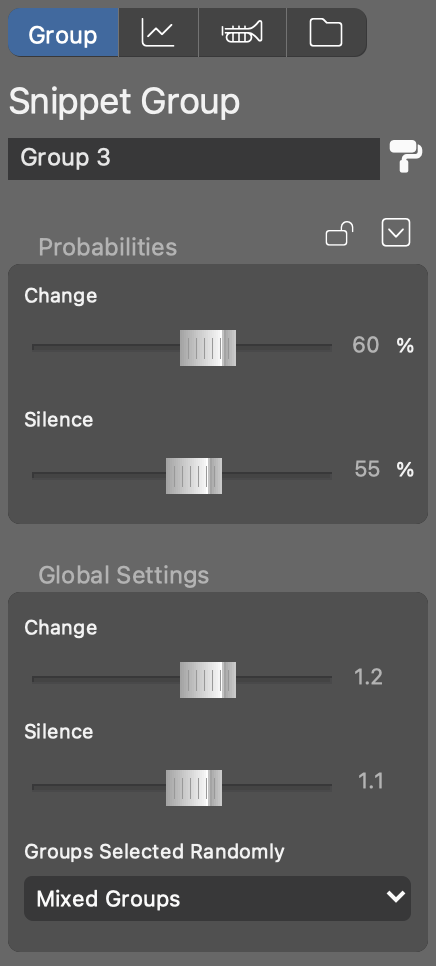
- Change the color of the group.
- Lock this group if you want to exclude it from random selection and rather control it manually.
- Probability Of Change
- When rolling the dice, this is how likely the current playback state of this group will change. If you want to control a group manually, you can disable this by selecting zero percent.
- Probability Of Silence
- When rolling the dice, this is how likely all snippets in this group will go silent. Set to zero if you want this group to play one of its snippets all the time.
- Global Settings
- Multiplies each group's probabilities with a factor you can set here. If you increase the silence factor, your random arrangement will, on average, become more sparse and less dense. If you increase the change factor, more snippets will be replaced on each turn, leading to more drama and variety. This setting is global (it shows the same values no matter which group is selected).
- Groups Selected Randomly
- Which types of snippet groups you want to include when you throw the dice. Groups that are locked or have zero change probability are not included anyway.